
I. OVERVIEW OF DIGITAL TRANSFORMATION
Digital transformation is a very broad concept encompassing the entire society. We have developed this document with the goal of proposing information, solutions, and software tailored to the needs of our partners. Specifically, the overview of tasks in Digital Transformation is as follows:
Figure 1: Overview of digital transformation
1. Data Digitization
1.1 General Description
Operational data will be entered through the software interface.
Scan paper documents and store them as digital data for data extraction and quick retrieval of electronic documents.
Convert paper documents to digital data, store as data files, and databases.
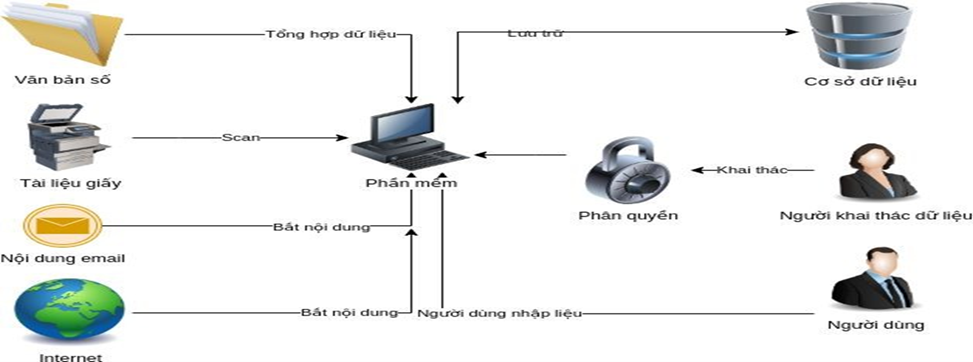
Figure 2: Data digitization
1.2 Advantages
-
Input data is controlled, minimizing human error.
-
Data is centralized, consistent, and not dispersed. Data storage methods are standardized.
-
The data system ensures 24/7 operation.
-
Data is secure and access is granted according to business functions.
-
Information is easy to search and trace.
-
Increased work productivity.
-
Cost savings: printing, personnel, time. Environmentally friendly.
-
Easy data recovery after incidents.
-
Saves workspace and area.
1.3 Disadvantages
-
Personnel need to meet minimum computer literacy requirements.
-
The transition time is not immediate, but divided into stages; additional work may arise during the transition period.
2. Digitizing Processes and Operations
2.1 General Description
-
The actual operating process will be transformed into a software process.
-
The process operates sequentially according to the business operations, indicating which step comes first and which comes later. Staff at each stage will receive notifications regarding the tasks to be processed at that stage.
-
The steps for creating requests and approvals will be confirmed on the software. Hard copy printing and signing will be scanned and uploaded to the system.
.png)
Figure 3: Digitizing processes and operations
2.2 Advantages
-
Employees work more efficiently thanks to software reminders.
-
The process ensures that all steps are followed correctly, without omissions or redundancies.
-
Leaders can make approval/disapproval decisions more easily.
-
Leaders can easily monitor the progress of work and projects.
-
Managers at all levels can easily understand the situation of their subordinates, allowing for timely rewards and disciplinary actions.
2.3 Disadvantages
-
Employees failing to complete one step will cause delays in another, and the process will need to be supplemented.
3. Data Analysis
3.1 General Description
-
Raw data is extracted and refined to serve reporting.
-
Reports will be categorized from general to detailed to serve daily work and important decision-making by leaders.
-
Complex reports will be pre-calculated to ensure that data retrieval does not require waiting time for aggregation.
.jpg)
Figure 4: Data analysis
3.2 Advantages
-
Fast data retrieval and exploitation
-
Report data will be instantaneous at the time of query
3.3 Disadvantages
-
Input data needs to be updated in real time to ensure reports are accurate
-
Input data needs to be strictly controlled; inaccurate input data can lead to inaccurate reports, affecting decision-making
4. Business Support Software Tools
4.1 General Description
-
Serves specific job functions: for example, timekeeping software will replace manual personnel access control, using devices and recording access data in the software
-
Specific business operations will be maximally supported by the software
-
Operators will focus on business operations and processes, while the software will support the remaining tasks
4.2 Advantages
-
Reduces errors caused by human operation
-
Data is recorded and pushed into reports instantly
4.3 Disadvantages Points
-
Personnel can change roles within the organization
5. Robotic Automation (RPA)
5.1 General Description
-
Handling repetitive tasks using software robots
-
Tasks can be processed according to procedures
-
Staff can build their own robot procedures as desired
5.2 Advantages
-
Staff will focus on important tasks, while time-consuming and repetitive tasks will be handled by robots.
-
Robots will process tasks faster and more accurately.
-
Robots operate 24/7 without downtime.
-
Optimizes operations for staff and the organization.
5.3 Disadvantages
-
Staff require maximum precision to avoid mass errors.
-
Personnel may change roles within the organization.
II.2. Digital Transformation Products
-
When an organization is storing data in multiple file formats, and data exists in forms such as:
-
Staff entering data and performing calculations in Excel
-
Reports and documents recorded in Word files
-
Specialized devices recording data in binary files
-
Reports from higher levels sent up in paper format, and staff needing to re-enter the data into a computer
-
Data recorded and reported via email
-
Data recorded and reported via chat platforms
-
Data aggregated from websites, such storage leads to data fragmentation, making searching and aggregation very resource-intensive, time-consuming, and labor-intensive, along with risks of data errors during the recording process.
-
We propose the following solutions to help our partners reduce these difficulties:
6. Data Digitization
6.1 Software for Extracting Data from Excel, Word, and Binary Data Files
Figure 5: Steps in extracting data from a file
Staff will upload the files to the system and select a robot to extract the data. After the data has been extracted, staff will review and verify or edit the data if necessary.
Staff can access and retrieve the data at any time.
6.2 Software for reading and converting data from scanned files to system data
Figure 6: Steps for transferring data from a scanned file
Staff will scan documents using specialized scanning devices (scanners, mobile phones, etc.) and upload the scanned files to the system. The system will extract the text content and send a report to the staff upon completion. Staff will review and confirm or edit the data if necessary.
Staff can access and retrieve data at any time.
6.3 Software for Converting Email Content to System Data
Figure 7: Steps for transferring data from email
The staff will set up source email addresses and define the email format to be collected by the robot. When new emails arrive, the robot will automatically filter and retrieve data from the emails that need to be collected. The staff will receive a notification when the robot has finished collecting the data. The staff will review and confirm or edit the data if necessary.
The staff can access the data at any time.
6.4 Software for converting chat content (Zalo, Viber, etc.) to system data
Figure 8: Steps for transferring data from chat
The officer will set up source account addresses and identify the content to be collected by the robot. When new chat content is available, the robot will automatically filter and retrieve data from the chat content to be collected. The officer will receive a notification when the robot has finished collecting the data. The officer will review and confirm or edit the data if necessary.
The officer can access the data at any time.
6.5 Software for Collecting Information from the Internet to System Data
Figure 9: Steps in gathering information from the internet
Staff will set up source websites or keywords, and the robot will use this to search for data based on those keywords. The data will be stored and compiled.
Staff can access and retrieve data at any time.
7. Digitizing Processes
The actual operating process will be controlled on the software system; staff will follow the digitized process to operate. Data will be stored for monitoring, management, reporting, and data exploitation.
7.1 Document Management Software
Figure 10: Features of document management software
Staff can add and edit document content directly within the software. Alternatively, they can create documents using other software and upload them to the system.
Managers can assign permissions for specific document types or documents to individual organizations and personnel. They can also define detailed permissions such as View, Edit, Delete, etc.
Staff can send and share documents externally via email and download them to their computers.
Staff can create print jobs directly within the software.
Leaders can monitor statistical reports at any time.
7.2 Human Resources Management Software
Figure 11: Features in human resource management software
Employee information will be recorded (or synchronized from other systems).
The timekeeping module will record the complete daily attendance schedule, serving to monitor working hours and calculate salaries effectively.
Work performance evaluations are recorded, configured, and assessed using the KPI (Key Performance Indicator) module.
Recruitment processes will go through various rounds, and the entire recruitment process will be managed through the Human Resources department.
Leaders can monitor statistical reports at any time.
7.3 Work Management Software
Figure 12: Features in task management software
Project information, project scope, project personnel, work items, deadlines, and project progress will be managed through the Project Management module.
The Task Management module will manage tasks from creation, execution schedule, responsible personnel, management personnel, clients, and progress. The Project Progress module will track an overview of all projects, their progress, issues, incidents, and client feedback.
The task progress module will encompass all organizational work, promptly alerting management to the situation and enabling timely decisions to ensure tasks are completed on schedule.
Client feedback and information will be managed in the Client module.
Management levels can monitor statistical reports at any time.
7.4 Inventory and Asset Management Software
Figure 13: Features in warehouse management software
All asset and material information will be recorded in the system.
Warehouse withdrawal operations such as sales, transfers, gifts, destruction, or other withdrawals will be recorded. The system will generate withdrawal slips, which can be printed, signed by relevant departments, and can be uploaded as scanned copies.
Warehouse receipt operations such as purchases, transfers, or other receipts will be recorded. The system will generate receipt slips, which can be printed, signed by relevant departments, and can be uploaded as scanned copies.
The warehouse manager will conduct periodic inventory checks. Any changes (if any) will be recorded and reported after each inventory check.
Warehouses may have transfers between warehouses; the system will monitor the entire process from withdrawal, transit, to warehousing. All changes in quantity are recorded.
Leaders can monitor statistical reports at any time.
8. Data Analysis
When an organization has a database system for analysis, business intelligence (BI) software will provide various features to exploit the data.
8.1 Comprehensive Reporting Software
Figure 14: Features in the comprehensive reporting software
Centralized data will be utilized through queries, reports, and statistical charts.
Operators will establish data sources to generate reports, charts, and statistics.
8.2 Intelligent Reporting Support Software
Figure 15: Features in intelligent reporting software
Operations staff will set up metrics and reports as required by management. Management will monitor performance through these reports and statistics.
Operations staff will establish data sources to generate reports, charts, and statistics.
9. Decision Support Software
Figure 16: Features in decision support software
Leaders will select criteria based on operational requirements. Operators will use these criteria to establish data sources and generate reports.
Leaders will monitor and adjust the criteria so that the system can provide useful information to support optimal decision-making.
10. Data Management and Sharing Software
Figure 17: Features in document management and sharing software
Data is stored centrally and can be shared based on business requirements.
Operators can establish access rights for specific data items.
Leaders can monitor data sharing and edit data (if necessary).
Business support software
The software will support in-depth business tasks for staff, ensuring more efficient and effective task completion.
10.1 Timekeeping Software
Figure 18: Features in the time attendance software
10.2 Meeting Room Booking Management Software
Figure 19: Features in meeting room booking management software
10.3 KPI Management Software
Figure 20: Features in KPI management software
10.4 Internal Chat Software
Figure 21: Features in the internal chat software
10.5 Approval Management Software
Figure 22: Features in the approval management software
11. Automation (RPA)
11.1 Software for automatically collecting data from emails
Figure 23: Features in the email automated collection tool
11.2 Software for automatically collecting data from the Internet
Figure 24: Features in the automated internet data collection tool
11.3 Software for automatically compiling data and sending reports
Figure 25: Features in the automated report generation and submission tool
